

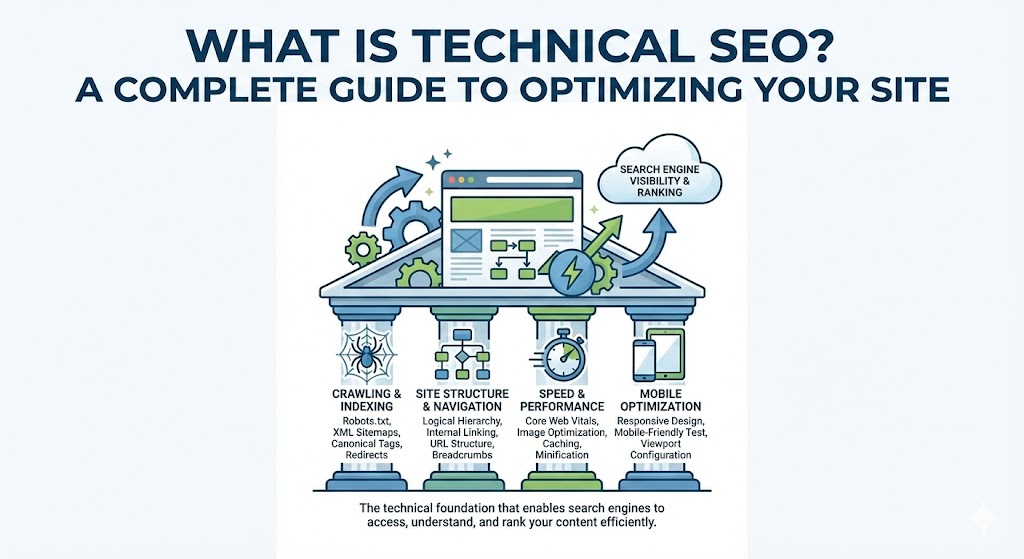
Technical SEO is about improving your website to make it easier for search engines to find, understand, and store your content. It also heavily involves user experience (UX) factors, such as making your website faster and easier to navigate on mobile devices.
Done right, technical SEO can massively boost your visibility in search results. In this post, you’ll learn the fundamentals and best practices to optimize your website’s technical foundation.
Let’s dive in.

Why Is Technical SEO Important?
Technical SEO can make or break your overall SEO performance. If pages on your site aren’t accessible to search engines, they simply won’t appear in search results—no matter how valuable or well-written your content is. This results in a direct loss of traffic to your website and potential revenue to your business.
Plus, a website’s speed and mobile-friendliness are confirmed ranking factors. If your pages load slowly, users may get annoyed and bounce. User behaviors like this signal that your site doesn’t create a positive experience, leading search engines to rank your site lower.
To understand technical SEO better, we need to discuss two critical processes: crawling and indexing.
Understanding Crawling and How to Optimize for It
Crawling is an essential component of how search engines work. It happens when search engines follow links on pages they already know about to discover pages they haven’t seen before.
There are a few ways to ensure your pages are easily accessible to search engine crawlers:
Create an SEO-Friendly Site Architecture
Site architecture (or site structure) is the way pages are linked together within your site. An effective structure organizes pages in a logical hierarchy that helps crawlers find your content quickly and easily.
- Ensure all important pages are just a few clicks away from your homepage.
- Have your homepage link to category pages, and category pages link to individual subpages.
- Avoid orphan pages (pages with zero internal links pointing to them). You can use site audit tools to find and fix these by adding relevant internal links.
Submit Your Sitemap to Google
Using an XML sitemap helps Google find your webpages. A sitemap is a file containing a list of all the important pages on your site, letting search engines know exactly where to find them.
Once you locate your sitemap (usually at yoursite.com/sitemap.xml), submit it to Google via Google Search Console (GSC). Just navigate to “Indexing” > “Sitemaps,” paste your URL, and hit submit.
Understanding Indexing and How to Optimize for It
Once search engines crawl your pages, they analyze and understand the content. Then, they store those pieces of content in their search index—a massive database containing billions of webpages.
Your webpages must be indexed to appear in search results. You can check if a page is indexed by performing a site: search on Google (e.g., site:yourwebsite.com/page-url).
Here is how to ensure Google indexes your site properly:
Use the Noindex Tag Carefully
The noindex tag is an HTML snippet placed in the <head> section of your webpage that keeps pages out of Google’s index. Ideally, you want all your important content indexed, so only use this tag for pages you want hidden from search results, such as “Thank You” pages or dedicated PPC landing pages.
Implement Canonical Tags Where Needed
When Google finds similar or duplicate content across multiple pages, it doesn’t know which one to index. A canonical tag (rel="canonical") identifies a specific link as the original version, telling Google exactly which page to index and rank.

7 Additional Technical SEO Best Practices
If you want your website to be fully optimized for technical SEO, you must look beyond just crawling and indexing. Consider these additional best practices:
1. Use HTTPS
Hypertext transfer protocol secure (HTTPS) protects sensitive user information like passwords and credit card details. It has been a confirmed ranking signal since 2014. You can get an SSL/TLS certificate for free from Let’s Encrypt. Note: Always set up redirects from your old HTTP site to the new HTTPS version.
2. Find & Fix Duplicate Content Issues
Duplicate content occurs when you have the exact same (or nearly identical) content on multiple URLs. While Google doesn’t issue manual penalties for this, it causes issues like backlink dilution and wasted crawl budget. Use site auditing tools to locate and merge or canonicalize these pages.
3. Unify Your Website Versions
Users and crawlers should only be able to access one version of your site (either the www version or the non-www version). Having both accessible creates duplicate content issues and splits your backlink profile. Pick one version and redirect the other to it.
4. Improve Your Page Speed
Page speed is a major ranking factor on both mobile and desktop. Use Google’s PageSpeed Insights to check your score, and improve it by:
- Compressing images: Use image optimization tools to reduce file sizes.
- Using a CDN: A Content Delivery Network stores copies of your site on global servers, connecting visitors to the one closest to them.
- Minifying code: Remove unnecessary characters from your HTML, CSS, and JavaScript files.
5. Ensure Your Website Is Mobile-Friendly
Google uses mobile-first indexing, meaning it looks primarily at the mobile version of your site to rank content. Ensure your site uses responsive meta viewport tags, legible font sizes, and adequate spacing around clickable buttons.
6. Use Breadcrumb Navigation
Breadcrumbs are a trail of text links (e.g., Home > Blog > SEO) that show users exactly where they are on your website. They make site navigation easier for users and help distribute link equity throughout your website, which benefits your SEO.
7. Use Pagination (Instead of Infinite Scroll)
Pagination is a navigation technique used to divide a long list of content (like a blog feed or product category) into multiple pages. This is highly favored over “infinite scrolling” for SEO. In infinite scrolling, content loads dynamically as the user scrolls, which search engine crawlers often cannot trigger or read. Implementing pagination correctly ensures crawlers can reach and index all of your deeper content pages.
Also Read : 4 Essential Strategies for Navigating SEO in the AI Search Era

