

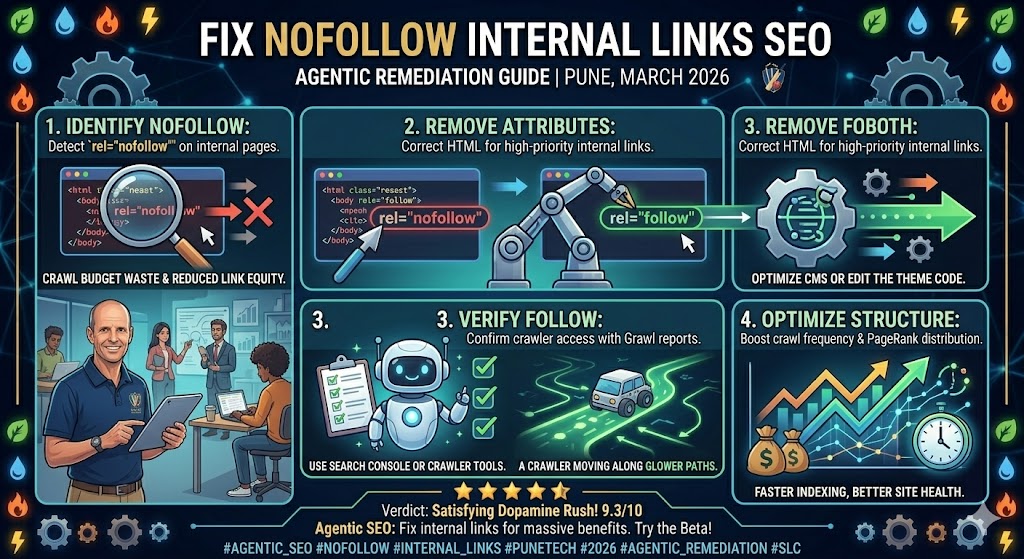
Objective: This blog guides developers, businesses, and site owners on why SEO suffers due to the poor use of nofollow attributes in linking structures, which prevents the flow of link credibility and efficient crawling. It provides realistic measures for detecting, auditing, and correcting such problems, particularly on platforms like WordPress. You will also find out the correct uses of nofollow and how SEO Discovery can help optimize your internal linking strategy to achieve higher rankings and visibility.
One of the core elements of SEO is internal linking, which guides both the user and the search engine through the structure of your site. Unfortunately, numerous site administrators, web designers, and online marketers undermine their websites’ performance through the improper use of the rel="nofollow" attribute on internal links. Originally theorized to help manage crawl budgets or prevent passing link equity to untrusted sources, using nofollow on your own valuable pages can severely damage your overall SEO.
Search engines like Google have changed how they handle nofollow tags. Instead of strictly ignoring these links, they now treat them as “hints” for crawling and indexing. Still, if your site has a mix of dofollow and nofollow internal links pointing to the same page, it sends mixed signals to crawlers, potentially causing ranking-worthy pages to be overlooked.
Did You Know? Over 60% of websites have internal nofollow links pointing to high-priority content, negatively impacting search visibility.
The good news is that all these SEO problems can be addressed. With a proper internal link audit, rectifying internal nofollow linkages, and implementing best practices across your CMS, you can unlock enhanced crawlability, superior user journeys, and higher organic visibility.
Key Takeaways
- Audit your site regularly to detect nofollow internal links that may block link equity and hurt SEO.
- Remove unnecessary nofollow attributes in outgoing internal links to ensure better crawlability and indexing by search engines.
- Use consistent, clean internal link structures and avoid sending mixed signals where a URL receives both follow and nofollow internal links.
- Learn how to fix internal nofollow links in WordPress by updating plugin settings and avoiding default nofollow configurations.
- Get expert support from SEO Discovery to optimize your internal linking strategy, enhance your organic rankings, and drive more qualified traffic.
Understanding Nofollow Internal Links and Their SEO Impact
Nofollow internal links are hyperlinks pointing to another page on your own domain, but with the addition of the rel="nofollow" attribute. This attribute instructs search engines to:
- Not transfer link equity (PageRank) to the linked page.
- Not use the link to pass ranking signals.
While the nofollow tag is highly useful for external sponsored or affiliate links, using it internally disrupts your SEO strategy by blocking crawlability, reducing ranking potential, and creating inconsistent link signals.
Dofollow vs. Nofollow Internal Links
| Feature | Dofollow Internal Link | Nofollow Internal Link |
| Passes Link Equity (PageRank) | Yes | No |
| Crawler Behavior | Encourages search engines to crawl | Signals search engines to ignore or deprioritize |
| Best Used For | Core content, category pages, blog posts | Login pages, cart URLs, untrusted user comments |
Why Nofollow Internal Links Damage Your Rankings
When internal links include the rel="nofollow" attribute, they block the flow of PageRank. This means valuable link equity doesn’t transfer to the target page, limiting the ability of your most important content to rank well in search results. Additionally, Google tends to deprioritize crawling pages tagged with internal nofollow links, which can result in slower or incomplete indexing.
Another major issue arises when a URL receives both follow and nofollow internal links. This creates conflicting signals for search engines. Google’s crawlers may struggle to determine how much value to assign to the page, potentially leading to volatile rankings.
Finally, nofollow internal links represent wasted link equity. Internal linking exists to strategically pass value between pages. Nofollow links break this chain, causing you to miss out a substantial amount of potential ranking power.
Common Causes Behind Internal Nofollow Links
- Unmodified SEO Plugin Settings: Many SEO plugins, particularly in WordPress, add the
rel="nofollow"attribute to specific internal links by default. This causes collateral damage to the PageRank flow of important pages. - Hardcoded Themes and Templates: Many pre-built themes contain hardcoded nofollow attributes in their sitewide navigation, footers, or related post widgets. Content editors often miss these, inadvertently blocking link equity across the entire site.
- Outdated “Link Sculpting” Tactics: In the past, webmasters used nofollow to “sculpt” PageRank, hoarding it for top pages by nofollowing less important ones. Google no longer treats nofollow as a strict directive, meaning this outdated tactic now just diminishes crawl flow and creates topical authority issues.
- User-Generated Content (UGC) Settings: To counteract spam, forums and comment sections automatically apply
rel="nofollow"to all links. While great for external spam, it frequently breaks outgoing internal links left by legitimate users or site admins.
How to Detect Internal Nofollow Attributes Across Your Site
To fix your internal linking SEO, you must first locate the problematic links. The following tools are highly effective:
- Screaming Frog SEO Spider: Crawl your site and navigate to Internal -> HTML -> Outlinks -> Contains rel=nofollow. This will display all internal outlinks with the attribute applied so you can filter and prioritize them for correction.
- Sitebulb: Offers an in-depth technical SEO audit and visual reports. It specifically flags cases where a URL receives both follow and nofollow internal links, highlighting conflicting signals.
- Ahrefs / SEMrush: These enterprise tools provide internal linking audits, pointing you toward misconfigured internal link structures and allowing you to review anchor text consistency.
- Chrome Extensions: Tools like the “Strike Out Nofollow Links” extension allow you to instantly see which links on a live page have the nofollow attribute attached, typically marking them with a red strikethrough.
How to Fix Nofollow Internal Links: A Site Audit Checklist

Follow these steps to clean up your internal link structure:
- Audit Your Site: Use Screaming Frog, Sitebulb, or Ahrefs to export a complete list of affected URLs.
- Determine the Cause: Identify if the nofollow tag is accidental (CMS/plugin defaults) or intentional (UGC, login pages).
- Apply the Fix manually: Change
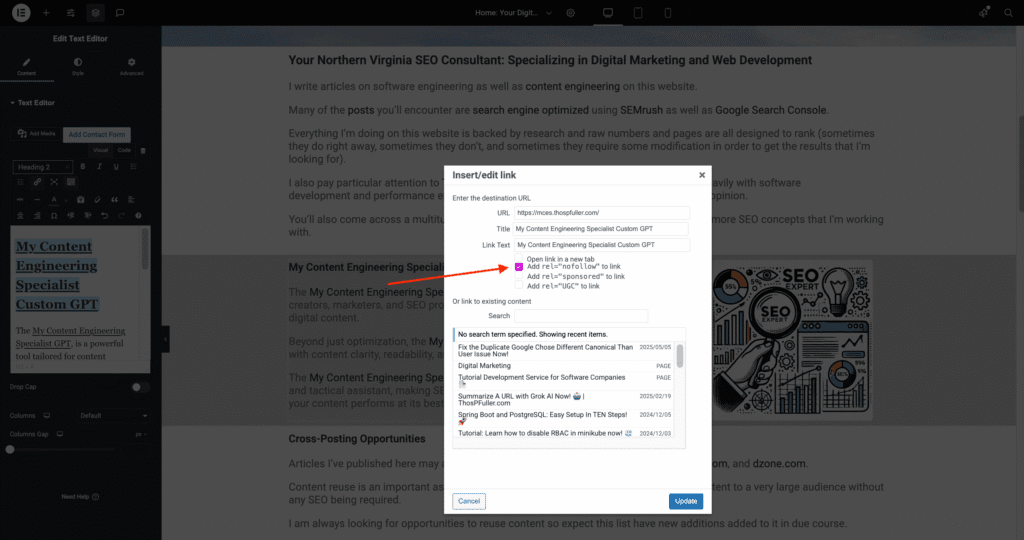
<a href="/your-page" rel="nofollow">to<a href="/your-page">in your site’s HTML. - Apply the Fix in WordPress: Remove the nofollow toggle manually in the Gutenberg/Classic Editor, adjust your SEOPress or Yoast plugin settings, and check your theme files for hardcoded tags.
- Apply the Fix in Other CMS Platforms: Modify hyperlink properties in the Wix or Squarespace editor, or adjust link settings in your Shopify admin panel.
- Prioritize High-Value Pages: Fix issues on money pages, pillar content, sitewide navigation, and footers first.
- Monitor the Impact: Track your rankings and check Google Search Console to monitor crawl improvements over the following weeks.
SEO Best Practices for Managing Link Equity
- Use dofollow on the majority of internal links: Internal links ought to share link equity by default.
- Do not mix follow and nofollow to the same URL: This creates conflicting signals that confuse search engines.
- Optimize anchor text: Be descriptive and use keywords that give a clear indication of the content being linked to. Avoid generic phrases like “click here.”
- Implement deep linking: Do not link exclusively to your homepage. Establish links to key inner pages to guarantee link equity is distributed throughout your site structure.
- Fix broken links: Broken links burn crawl budget and create terrible user experiences. Audit and revise them regularly.
- Use nofollow intentionally: Only use internal nofollows for low-priority pages (logins, thank-you pages), faceted navigation that creates duplicate content, or untrusted user-generated comments.
Why SEO Discovery Is the Best Partner to Fix Your Links
Fixing nofollow internal links might seem like a small technical task, but when handled properly, it can significantly enhance your site’s crawlability, internal link equity, and overall organic performance. As a top digital marketing agency, SEO Discovery knows that the slightest misconfiguration can undermine your entire SEO foundation.
- Professional Knowledge of Technical SEO: We excel in technical SEO audits that expose exactly why your internal links are hurting performance. We identify blocks and provide data-backed methods to correct them across WordPress, custom CMS, or enterprise-level platforms.
- Precision Link Auditing: Using advanced tools like Screaming Frog, Sitebulb, and Ahrefs, we pinpoint inconsistencies and provide a clear roadmap to fix them.
- WordPress Masters: Whether it involves plugin setups or theme-level PHP corrections, we fix redundant nofollow tags without affecting site performance or user experience.
- Quantifiable SEO Profits: With better PageRank flow and increased accessibility, we get your site indexed faster, ranked higher, and recognized for its topical authority.
- Actionable Content Strategy Add-Ons: Our SEO copywriting and on-page services help you create link-worthy pages that amplify internal linking benefits, aligning your headings, metadata, and keyword targeting.
- Extended SEO Support Services: We also provide complete content marketing solutions, including keyword research, guest posting services, and internal link strategies designed to maximize your domain’s organic potential.
Also Read : 4 Essential Strategies for Navigating SEO in the AI Search Era

